Updated on Aug 2012
I have made 15 videos about visual studio ALM, I tried to make it simple so it would be easy if you are new to ALM / TFS. Also I have added some of best practices that every developer should do it like Check-in Policies, shelving, Unit Testing and code coverage
Note: This was made on vs2010 but same concepts can be used with vs2012

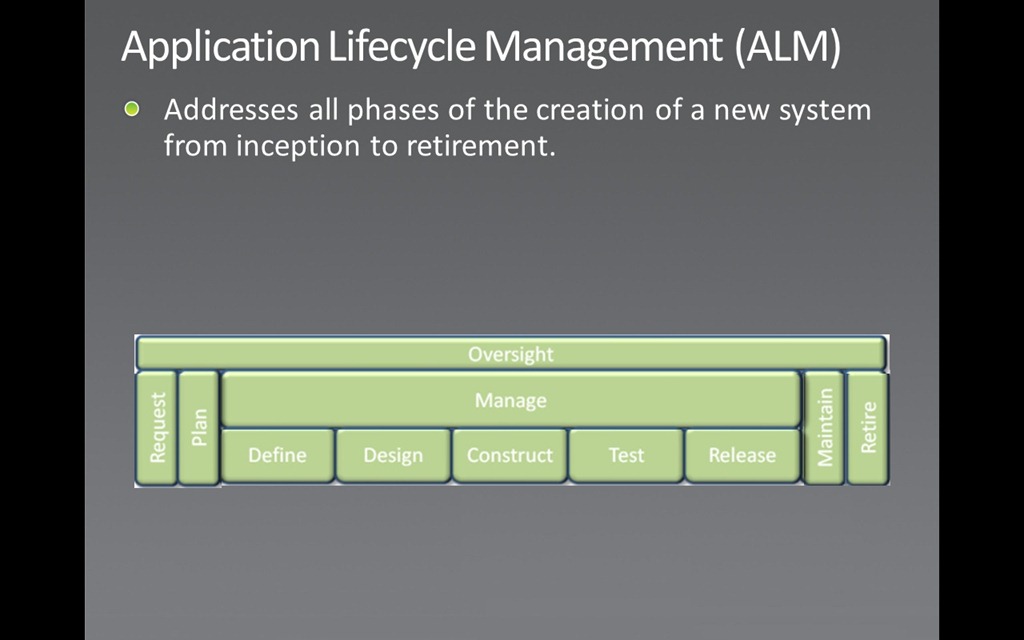
Lesson 1 : ALM Quick Overview
Explaining what is Application Life Cycle Management and how its bigger than Software Development Life Cycle
Lesson 2 : Creating Team Projects
This video shows How to create a team project
Software projects in Team Foundation are called team projects and are very different from the software projects (.csprj or .vbproj) in Visual Studio. The team project is the central concept that holds together the team endeavor of creating a specific software technology or product. When you create a team project, the New Team Project Wizard creates a number of focal points by which to centralize the team efforts. A team project Web site is created containing document templates, and predefined reports. A work item database is created for tracking all effort on the project. A process template is installed that determines rules, policies, security groups, and queries for all work effort. A source code branch is created for source control.
Lesson 3 : Work Item Tracking
Team Foundation has work item tracking features designed to assist software development teams to manage their work, track, monitor, and report on the development of a product and its features.
A work item is a database record that you create in Visual Studio Team Foundation Server to record the definition, assignment, priority, and state of work
In Team Foundation, a work item tracks this work, and can be:
o one of the individual tasks required to complete a project
o a bug that needs to be fixed
o a scenario that the project needs to address
o or any other piece of work in a project that needs to be tracked in a database
Lesson 4 : Mapping Source Control Folders
Version Control (aka Source Control) lets you track your files over time. Why do you care? So when you mess up you can easily get back to a previous working version.
Lesson 5: Creating Solutions & Projects
Adding new solution with C# or VB project
Lesson 6 : Check-in Policies
The following video show the check in and also talks about the check in policy (one of the best practices in developing software)
Lesson 7: Branching & Merging
Shows one of the best practices when dealing with source control
Lesson 8 : Getting Specific Versions
Shows how to get a specific version of the files you check in source control
Lesson 9 : Checking Out
Shows checking out with its options for example you may want to check out a file and restrict anyone from writing in it while you are working in it
Lesson 10: Labeling
With version control let you tag (label) any revision for easy reference. This way you can refer to “Release 1.0″ instead of a particular build number:
Lesson 11 : Shelving
Shelving is a nice way to share code with team for code review and has other uses that is explained in the video
Lesson 12 : Annotation & Conflict Resolution
When changes overlap and contradict then the version control reports a conflict and not let you check in — it’s up to you to check in a newer version that resolves this dilemma. A few approaches:
· Re-apply your changes. Sync to the the latest version and re-apply your changes to this file
· Override their changes with yours. Check out the latest version , copy over your version and check your version in.
Lesson 13: Team Build
Team Build is a build server application included with Team Foundation Server, which is installed alongside visual studio. Developers use Team Build to perform complete builds of the most recent versions of software contained in source control. Records of every build, whether it succeeds or fails, are kept so that developers can keep track of the progress of the project
Lesson 14: Unit Testing & Code Coverage
The following video shows the Unit Testing as its one of the best practices for developing applications
Unit testing is a Software verification and validation method in which a programmer tests if individual units of source code are fit for use. It is usually conducted by the development team.
Lesson 15: Coded UI Testing
You can create automated tests of the user interface (UI) known as coded UI tests. These tests provide functional testing of the user interface and validation of user interface controls. Automated UI tests enable you to test that the user interface is functioning correctly after code changes. They are quicker to run than manual tests. Therefore, you can run them more frequently.
Happy ALM 




![Microsoft elITe[4]](https://anasr.net/wp-content/uploads/2012/10/microsoft-elite4.jpg?w=644&h=127 "Microsoft elITe[4]")

![clip_image001[6]](https://anasr.net/wp-content/uploads/2012/04/clip_image0016.gif "clip_image001[6]")
![clip_image002[4]](https://anasr.net/wp-content/uploads/2012/04/clip_image0024.jpg "clip_image002[4]")
![clip_image003[6]](https://anasr.net/wp-content/uploads/2012/04/clip_image0036.gif "clip_image003[6]")
![clip_image004[8]](https://anasr.net/wp-content/uploads/2012/04/clip_image0048.gif "clip_image004[8]")
![clip_image003[7]](https://anasr.net/wp-content/uploads/2012/04/clip_image0037.gif "clip_image003[7]")
![clip_image005[46]](https://anasr.net/wp-content/uploads/2012/04/clip_image00546.gif "clip_image005[46]")
![clip_image005[47]](https://anasr.net/wp-content/uploads/2012/04/clip_image00547.gif "clip_image005[47]")
![clip_image005[48]](https://anasr.net/wp-content/uploads/2012/04/clip_image00548.gif "clip_image005[48]")
![clip_image006[56]](https://anasr.net/wp-content/uploads/2012/04/clip_image00656.gif "clip_image006[56]")
![clip_image005[49]](https://anasr.net/wp-content/uploads/2012/04/clip_image00549.gif "clip_image005[49]")
![clip_image006[57]](https://anasr.net/wp-content/uploads/2012/04/clip_image00657.gif "clip_image006[57]")
![clip_image005[50]](https://anasr.net/wp-content/uploads/2012/04/clip_image00550.gif "clip_image005[50]")
![clip_image005[51]](https://anasr.net/wp-content/uploads/2012/04/clip_image00551.gif "clip_image005[51]")
![clip_image005[52]](https://anasr.net/wp-content/uploads/2012/04/clip_image00552.gif "clip_image005[52]")
![clip_image005[53]](https://anasr.net/wp-content/uploads/2012/04/clip_image00553.gif "clip_image005[53]")
![clip_image005[54]](https://anasr.net/wp-content/uploads/2012/04/clip_image00554.gif "clip_image005[54]")
![clip_image005[55]](https://anasr.net/wp-content/uploads/2012/04/clip_image00555.gif "clip_image005[55]")
![clip_image005[56]](https://anasr.net/wp-content/uploads/2012/04/clip_image00556.gif "clip_image005[56]")
![clip_image005[57]](https://anasr.net/wp-content/uploads/2012/04/clip_image00557.gif "clip_image005[57]")
![clip_image005[58]](https://anasr.net/wp-content/uploads/2012/04/clip_image00558.gif "clip_image005[58]")
![clip_image006[58]](https://anasr.net/wp-content/uploads/2012/04/clip_image00658.gif "clip_image006[58]")
![clip_image005[59]](https://anasr.net/wp-content/uploads/2012/04/clip_image00559.gif "clip_image005[59]")
![clip_image006[59]](https://anasr.net/wp-content/uploads/2012/04/clip_image00659.gif "clip_image006[59]")
![clip_image005[60]](https://anasr.net/wp-content/uploads/2012/04/clip_image00560.gif "clip_image005[60]")
![clip_image005[61]](https://anasr.net/wp-content/uploads/2012/04/clip_image00561.gif "clip_image005[61]")
![clip_image005[62]](https://anasr.net/wp-content/uploads/2012/04/clip_image00562.gif "clip_image005[62]")
![clip_image007[16]](https://anasr.net/wp-content/uploads/2012/04/clip_image00716.gif?w=123&h=37 "clip_image007[16]")
![clip_image006[60]](https://anasr.net/wp-content/uploads/2012/04/clip_image00660.gif "clip_image006[60]")
![clip_image005[63]](https://anasr.net/wp-content/uploads/2012/04/clip_image00563.gif "clip_image005[63]")
![clip_image006[61]](https://anasr.net/wp-content/uploads/2012/04/clip_image00661.gif "clip_image006[61]")
![clip_image005[64]](https://anasr.net/wp-content/uploads/2012/04/clip_image00564.gif "clip_image005[64]")
![clip_image005[65]](https://anasr.net/wp-content/uploads/2012/04/clip_image00565.gif "clip_image005[65]")
![clip_image005[66]](https://anasr.net/wp-content/uploads/2012/04/clip_image00566.gif "clip_image005[66]")


 Ahmed Nasr's Blog